
ERP System in Simple Words: What It Is, How It Works, and Why Your Business Needs It
10/2/26

Author
Kirill Chistiakov

A company accepts orders in one system. It tracks inventory balances in another. Finances are handled in accounting software. Procurement is monitored via spreadsheets. Manufacturing maintains its own records, and management gathers information from multiple sources to understand the real state of the business.
While the company is small, such a structure can work. But as the business grows, the number of orders, products, employees, suppliers, warehouses, payments, and internal operations increases. At a certain point, the problem is no longer a lack of data. On the contrary, there is too much data, but it resides in different systems and does not always align. ERP helps unite these processes into a single working environment.
What is an ERP system
ERP stands for Enterprise Resource Planning. In simple terms, an ERP system is software designed to manage a company's core resources and internal processes.
Finances, procurement, sales, orders, warehouse, manufacturing, logistics, human resources, projects, and other operations can be interconnected within a single system. However, the key feature of ERP is not merely its breadth of functions. The true value emerges when different processes use shared data and pass information to one another.
A sale generates an order. The warehouse checks stock levels. If stock is insufficient, a procurement or manufacturing requirement is created. Once shipped, inventory balances update. The finance module receives the data needed for invoicing and accounting. Instead of several disconnected processes, the company gets a single cohesive system.
How ERP works in practice
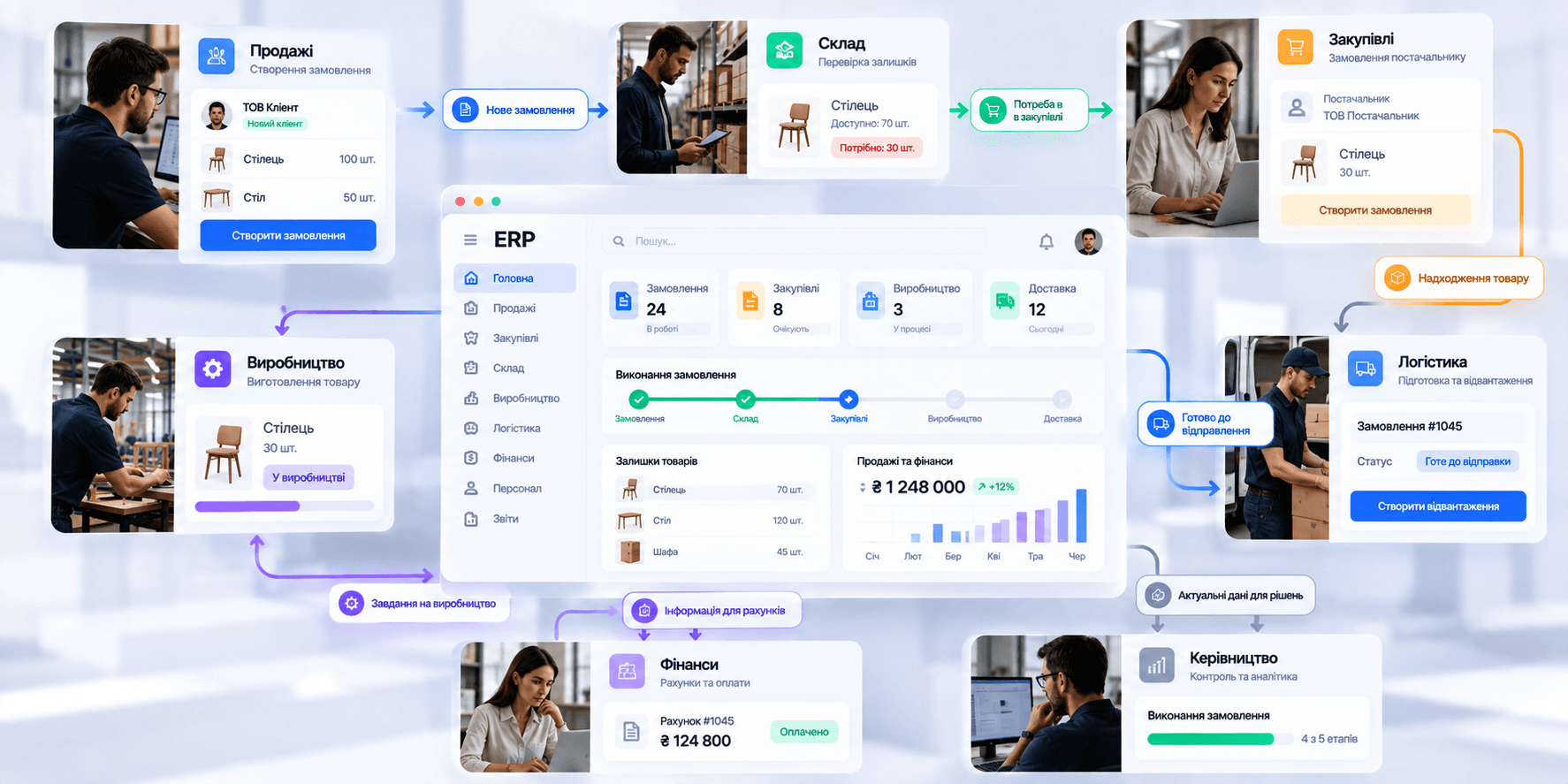
Imagine a company that sells equipment. A customer places an order. The manager enters it into the system. The ERP can immediately check whether the required item is in stock. If the item is available, the needed quantity is reserved for that specific order.
If stock is insufficient, the system can flag the need for procurement or manufacturing. The purchasing specialist sees what needs to be ordered from the supplier. Once the goods arrive, inventory levels update automatically. Logistics receives notification that the order is ready for dispatch.
The finance department sees the invoice, payment, and associated transactions. The executive can view the overall process status without needing to request separate reports from every department. A single transaction smoothly progresses through different parts of the business, with data moving along with it.
ERP creates a single source of truth
One of the biggest issues for companies relying on multiple standalone systems is data duplication. The sales department's spreadsheet might show one inventory figure. The warehouse system shows another. The finance department maintains a third file, while a manager relies on their own personal spreadsheet.
As a result, employees spend time verifying which version is correct instead of working with the information. ERP helps establish a unified data structure. A product has one identifier. An order has one status. Stock level data is updated centrally. Financial transactions are linked to their corresponding orders and documents.
This does not mean that every employee sees every piece of information. Roles and access permissions can vary. However, all departments work with the same up-to-date data.
Which processes an ERP can integrate

The architecture of an ERP depends on the business. A manufacturing company requires one set of modules; a distributor needs another. A service business might not need warehouse or manufacturing modules at all. Nevertheless, there are several common functional areas.
Finance
The financial module can handle invoices, payments, revenue, expenses, accounts receivable and payable, budgets, and financial reporting. A key advantage is that financial data can be directly linked to other operational activities.
For example, an order, shipment, and payment do not exist as three disconnected entries in separate applications.
Sales and orders
ERP can oversee order creation, processing, and fulfillment. The team has visibility into order composition, item quantities, fulfillment status, payment, shipping, and related documentation.
Procurement
The system can help manage suppliers, purchase requests, purchase orders, pricing, delivery schedules, and goods receipt. The ability to link procurement directly to real business demands is especially valuable.
Warehouse
ERP can track stock balances, reservations, inventory transfers, batches, and transactions across multiple warehouses. This enables different teams to work with real-time data regarding product availability.
Manufacturing
For manufacturing companies, an ERP can manage materials, bills of materials (BOM), production orders, manufacturing stages, resource utilization, and finished goods.
Logistics
The system can assist in managing shipments, deliveries, routes, order statuses, and other logistics operations.
Human Resources
Certain ERP solutions include management of employees, organizational structure, working hours, leave requests, expenses, and other HR processes.
Projects
For project-based businesses, ERP can integrate project budgets, resources, tasks, expenses, and financial outcomes.
ERP connects departments with each other
An isolated module can be useful, but the true strength of an ERP lies in the connections between modules. Consider a simple scenario.
The sales department enters an order for 100 units of a product. The warehouse sees that only 70 are available. The system flags a deficit of 30 units. Procurement receives an alert indicating the need to replenish stock.
Once the goods arrive, the warehouse updates the quantity. The order moves to the shipping stage. After the operation is complete, the finance module receives all the necessary information.
Each department works within its part of the process, but the system binds these parts together. That is why an ERP should not be viewed as merely an oversized accounting program. It is an infrastructure for managing a company's interconnected processes.
ERP helps eliminate duplicate data entry

One of the most insidious operational problems occurs when the same data is entered multiple times. A manager creates an order. Then someone copies it into the warehouse system. The finance department re-enters parts of that information for invoicing. Logistics receives a separate spreadsheet for delivery.
Each manual transfer takes time and introduces the potential for error. In an integrated ERP, data can flow between processes automatically. This allows employees to focus more on the task at hand and spend less time copying information between applications.
Automation is an essential component of ERP
Many internal processes follow clear rules. If an inventory level drops below a certain threshold, the responsible employee must be notified. If an invoice is overdue, a reminder needs to be generated. If a purchase amount exceeds a defined limit, managerial approval is required. If an order is packed, it needs to be moved to the next stage.
Such operations can be partially automated. An ERP can trigger tasks, update statuses, notify users, pass data between modules, and ensure adherence to established business rules.
However, automation only works well when the underlying process is clear. Automating chaos simply produces faster chaos.
ERP helps you see the business as a unified system
When every department uses a separate tool, management often sees the business in fragments. Sales presents one report. The warehouse presents another. Finance delivers a third. To get the big picture, data must be consolidated manually.
ERP allows analytics to be built on data drawn from multiple processes. For instance, you can analyze not just sales volume, but also the profitability of specific items, procurement costs, inventory turnover, order fulfillment times, and accounts receivable.
This makes ERP not only an operational tool, but also a vital source of insight for managerial decision-making.
When a business needs an ERP

There is no specific employee headcount or revenue threshold after which a company must automatically implement an ERP. The complexity of its processes is far more important.
The initial warning signs often appear long before the business starts phrasing the problem as the need for an ERP. Employees are constantly transferring data between programs. The company relies on numerous spreadsheets for operational management. Departments have conflicting versions of the same information. It is difficult to quickly ascertain actual inventory levels. Preparing a management report takes days.
Orders must be handed off manually between departments. Managers only find out about issues after they have affected customers. New hires spend weeks trying to figure out where necessary information is stored.
If such scenarios become part of day-to-day operations, the root cause may no longer be a specific software tool, but the architecture of the entire operational system.
When an ERP might be unnecessary
An ERP is not a mandatory milestone for every growing company. For a small business with simple processes, implementing a massive system can create more friction than value.
If a company has a handful of straightforward processes that run smoothly in specialized tools, there is no need to combine everything merely for the sake of using an ERP.
The cost of implementation must also be taken into account. ERP is not just software. You need to map out processes, configure the system, migrate data, integrate other services, train the team, and maintain the system after launch.
Therefore, the decision to implement an ERP should stem from a clear business problem, not from the simple desire to adopt a new platform.
Types of ERP systems
One way to classify ERP systems is by where the system runs and who manages its infrastructure.
Cloud ERP
The system runs on cloud infrastructure and is accessible via the internet. The company does not need to deploy and maintain an entire server infrastructure on premises.
This model can simplify updates, scaling, and access for employees across different locations.
On-premise ERP
The system runs on the company's own infrastructure. This approach may be chosen by organizations with strict requirements regarding infrastructure control, data ownership, security, or legacy internal integrations.
Hybrid ERP
Part of the system runs locally on-premise, while other components leverage cloud solutions. This option can be suitable for companies modernizing a large legacy infrastructure incrementally or those with varying requirements across different processes.
ERP and CRM are not the same thing

CRM and ERP are often used together, but they serve different primary purposes. CRM focuses predominantly on customer-facing interactions: leads, contacts, deals, communications, sales pipelines, and interaction history.
ERP focuses primarily on what happens within the business behind or alongside those operations: orders, inventory, procurement, manufacturing, finance, logistics, and company resources.
For example, a sales rep closes a deal in the CRM. The order details are transferred to the ERP. The ERP verifies stock, reserves the goods, triggers necessary internal workflows, monitors fulfillment, and passes the transaction data to the finance module.
CRM helps manage customer relationships. ERP helps the business fulfill its commitments to those customers.
ERP and accounting systems are not the same thing either
Financial accounting is an essential component of an ERP, but an ERP is much broader. An accounting system focuses primarily on financial transactions, accounting documents, tax compliance, and reporting.
An ERP can additionally manage inventory, procurement, manufacturing, orders, logistics, human resources, and other assets. Finance in such a system becomes one of several interconnected modules.
This ensures that financial metrics are formed directly from real operational events, rather than being compiled exclusively through manual entries.
Off-the-shelf ERP vs. custom-built system
Off-the-shelf ERP platforms offer one clear advantage: a large portion of standard business processes is already built in. A company does not need to design accounting, warehousing, procurement, or basic order workflows completely from scratch. For many businesses, this is sufficient.
Problems begin when a company's actual operational model diverges significantly from the built-in logic of the platform. The result is dozens of custom fields, complex workarounds, external spreadsheets, manual bypasses, and standalone tools for workflows that the ERP cannot handle properly.
In this scenario, there are several paths forward. You can adapt your processes. You can customize the existing ERP. You can build an internal tool on top of the ERP. And for unique business models, developing a proprietary custom system can sometimes be justified.
The right decision depends on scale, process complexity, budget, and the extent to which these processes deliver a competitive advantage for the business.
A business should not force all its processes to fit an ERP
Companies implement ERP to make operations more efficient. Sometimes, however, the opposite happens.
Teams begin performing extra steps simply because the system was designed that way. Employees fill out fields that no one needs. They transfer data between modules by hand. They create spreadsheets to circumvent limitations. They take five steps instead of one.
As a result, the system formally tracks the process, but in practice, it creates extra administrative overhead.
Before designing or implementing an ERP, it is essential to understand how the business operates today and how it should operate in the future. Which processes are truly necessary? Which steps can be eliminated? What can be automated? Where is approval required? What data needs to be shared across departments?
Only after answering these questions should the process be migrated into the system.
Why UX is critical for an ERP

An ERP can be one of the most complex software systems company employees encounter. It may contain hundreds of features, dozens of modules, dense tables, forms, filters, statuses, and complex entity relationships.
Consequently, poor UX in an ERP carries a very concrete price tag. If an action an employee performs 50 times a day requires three unnecessary clicks, those wasted clicks multiply thousands of times over the course of a year.
If users find a form's layout confusing, error rates climb. If critical data is difficult to locate, employees revert to creating their own spreadsheets. If basic tasks require constant retraining, onboarding new hires takes significantly longer.
The UX of an internal system directly influences overall operational efficiency.
Different roles require different interfaces
An ERP may be used by a wide variety of employees, but their daily tasks vary greatly.
A warehouse worker does not need a financial dashboard. A purchasing manager does not need to see all HR features. An executive does not need to interact with a goods receiving form every day. An accountant needs fundamentally different data than a logistics manager.
That is why a well-designed ERP interface is built around roles and user journeys. A user should see only the information and actions necessary for their work, not the entire breadth of system functionality all at once.
An ERP dashboard should highlight where attention is needed

Displaying ten charts is not enough. A great dashboard helps the user understand process health and quickly spot anomalies.
An executive might focus on sales, margins, overdue payments, problematic orders, and inventory levels. A procurement officer needs to see low-stock items, delayed shipments, and purchase requests awaiting approval. A warehouse manager needs visibility into upcoming shipments, product shortages, and pending operations.
An ERP should not simply present raw data. It should help users understand where intervention is needed.
Automation must remain transparent
In a complex ERP, a single action can trigger multiple downstream processes. Confirming an order might reserve stock, create a fulfillment task, generate an invoice, and update the financial forecast.
This is convenient as long as the user understands what just happened. If the system performs many hidden actions without clear feedback, employees lose trust in it.
Automation must therefore remain transparent. It is vital for users to clearly see the outcome of an action, process status, assigned owners, and an audit trail of changes.
How to tell when an ERP needs a redesign
A legacy ERP can remain technically functional for years. However, that does not mean it remains efficient.
There are several telltale signs. Employees routinely export data into Excel. Certain processes are managed entirely outside the ERP. The interface is cluttered with fields that no one uses. New hires require extensive manuals to perform basic tasks. Different modules follow completely different logic.
Finding simple information requires jumping between multiple screens. Customizing reports is impossible without engineering assistance. Users invent their own workarounds.
When these issues arise, the problem is usually not just a single button or form. You need to rethink the information architecture, user roles, workflows, and overall product structure.
How to design an ERP system properly
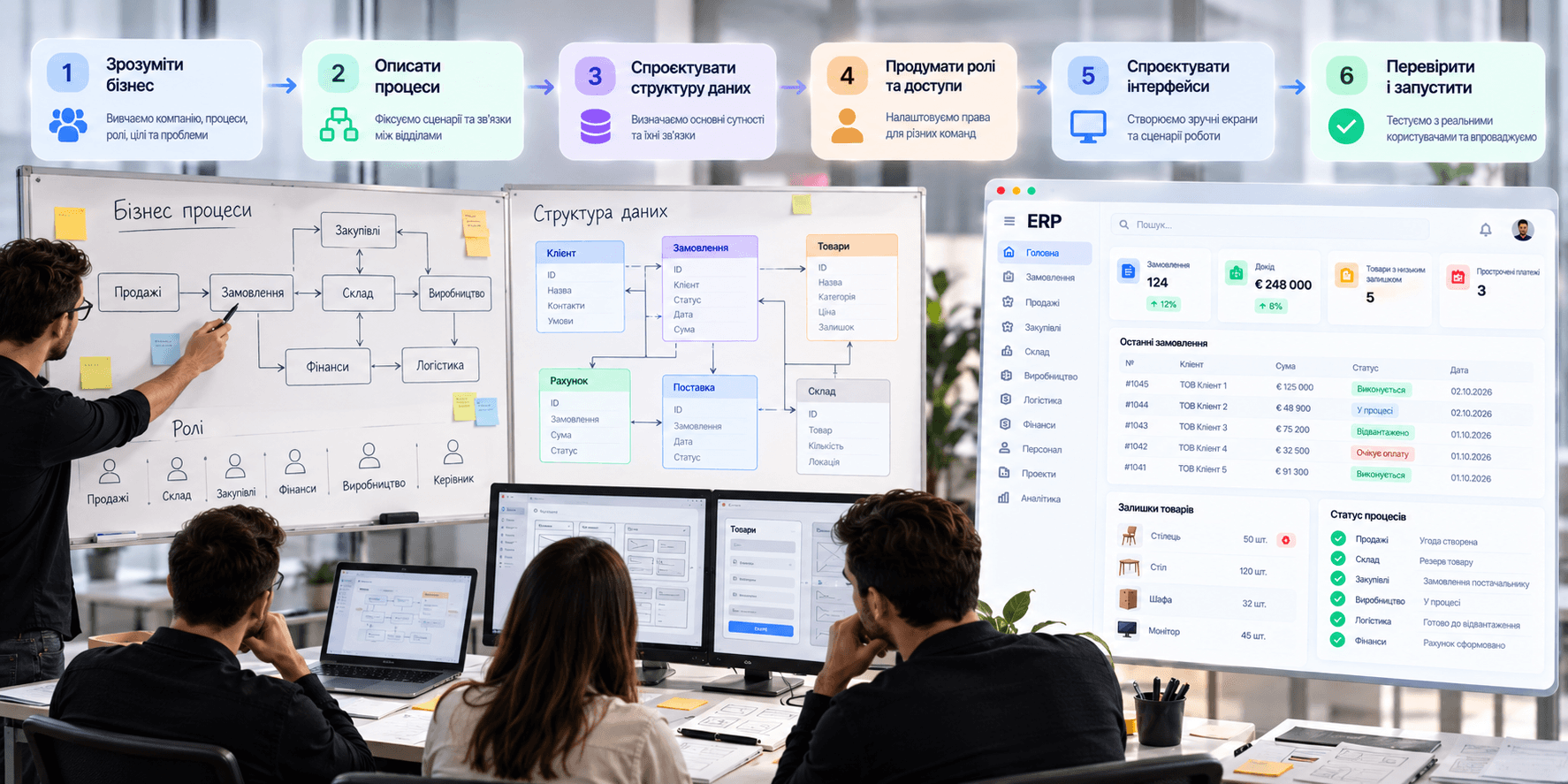
Designing an ERP should never start with drawing a dashboard. First, you must understand the business.
Which departments participate in the processes? What roles exist? What data does each role generate? Who consumes that data downstream? Which decisions require approval? Which tasks are recurring? Where do errors and bottlenecks occur?
Only then can you map out the business processes and the connections between them. The next level is the data architecture.
Customers, suppliers, products, orders, invoices, payments, warehouses, batches, production operations, and other entities must have clean, logical relationships.
Next, roles, access permissions, and primary user flows are defined. Only after that should you move on to screen layouts and UI design.
In complex ERP systems, a great interface is the result of thoroughly designed logic, never the other way around.
An ERP should reduce operational complexity
Business can be complicated. A large enterprise may truly manage thousands of products, hundreds of employees, dozens of warehouses, multiple legal entities, and intricate supply chains.
The goal of an ERP is not to hide this complexity from view. Its goal is to organize it properly.
Employees see only what they need for their specific tasks. Information flows between departments without duplicate entry. Automation handles routine tasks. Leadership has real-time visibility into the health of the business. Teams work from the same source of truth.
That is when an ERP stops being just another bloated piece of enterprise software and becomes the true operating system of the business.


" width="68.80023495816431px"><path d="M 4.853 0.229 C 2.752 -0.794 0.742 1.857 0 3.31 C 0.62 7.42 0.421 10.396 0.244 11.37 C 1.34 12.771 4.906 13.54 5.957 11.548 C 7.007 9.558 7.477 1.511 4.852 0.23 Z" fill="rgb(255, 255, 255)" height="12.755288116790886px" id="ZCZVTiIXa" stroke-dasharray="" stroke-linecap="butt" stroke-linejoin="miter" stroke-miterlimit="10" stroke-width="1.23" stroke="rgb(0, 0, 0)" transform="translate(62.007 43.767)" width="6.793097659580333px"/><path d="M 0 0 C 1.437 0.617 2.272 3.716 0.258 5.234" fill="transparent" height="5.233798974902236px" id="AacllobhZ" stroke-dasharray="" stroke-linecap="butt" stroke-linejoin="miter" stroke-miterlimit="10" stroke-width="1.23" stroke="rgb(0, 0, 0)" transform="translate(64.709 47.658)" width="1.4545419866479055px"/><path d="M 1.94 0.229 C 4.041 -0.794 6.051 1.857 6.794 3.31 C 6.173 7.42 6.372 10.396 6.549 11.37 C 5.454 12.771 1.887 13.54 0.837 11.548 C -0.214 9.558 -0.684 1.511 1.94 0.23 Z" fill="rgb(255, 255, 255)" height="12.755288116790886px" id="pEDJQVy2w" stroke-dasharray="" stroke-linecap="butt" stroke-linejoin="miter" stroke-miterlimit="10" stroke-width="1.23" stroke="rgb(0, 0, 0)" transform="translate(0 43.767)" width="6.7942440549467005px"/><path d="M 1.455 0 C 0.018 0.617 -0.818 3.716 1.197 5.234" fill="transparent" height="5.233798974902236px" id="xOvJKZNxm" stroke-dasharray="" stroke-linecap="butt" stroke-linejoin="miter" stroke-miterlimit="10" stroke-width="1.23" stroke="rgb(0, 0, 0)" transform="translate(2.638 47.658)" width="1.4550601551503437px"/><path d="M 38.403 68.113 C 26.454 72.892 13.11 63.334 7.932 57.955 C 2.196 50.786 0.363 36.246 0.164 29.874 C -0.314 26.05 0.363 17.527 0.763 13.743 L 3.749 5.376 L 14.504 1.195 L 37.806 0 C 39.997 0.398 45.454 1.553 49.755 2.987 C 55.133 4.78 57.522 13.742 58.121 16.133 C 58.599 18.044 58.32 34.853 58.121 43.019 C 57.522 47.798 53.341 62.138 38.403 68.113 Z" fill="rgb(255, 255, 255)" height="69.41149940138297px" id="yZYyIx6io" stroke-dasharray="" stroke-linecap="butt" stroke-linejoin="round" stroke-width="1.23" stroke="rgb(0, 0, 0)" transform="translate(4.872 16.589)" width="58.38457217823136px"/><path d="M 16.131 9.081 C 13.941 3.704 7.648 -4.303 0 6.69 C 2.191 10.675 8.485 16.728 16.131 9.081 Z M 28.678 7.886 C 30.868 2.508 37.162 -5.497 44.809 5.496 C 42.619 9.479 36.326 15.534 28.678 7.886 Z" fill="transparent" height="12.75153470949805px" id="Q5nplVQds" stroke-dasharray="" stroke-linecap="butt" stroke-linejoin="miter" stroke-miterlimit="10" stroke-width="1.23" stroke="rgb(0, 0, 0)" transform="translate(11.605 43.954)" width="44.80918164991997px"/><path d="M 0 4.182 C 0 1.872 1.872 0 4.182 0 C 6.492 0 8.364 1.872 8.364 4.182 C 8.364 6.492 6.492 8.364 4.182 8.364 C 1.872 8.364 0 6.492 0 4.182 Z" fill="rgb(0, 0, 0)" height="8.364249629374285px" id="CsixW4Nye" transform="translate(43.274 45.863)" width="8.364249629374271px"/><path d="M 0 4.182 C 0 1.872 1.872 0 4.182 0 C 6.492 0 8.364 1.872 8.364 4.182 C 8.364 6.492 6.492 8.364 4.182 8.364 C 1.872 8.364 0 6.492 0 4.182 Z" fill="rgb(0, 0, 0)" height="8.364249629374264px" id="mtQGxWjK3" transform="translate(14.591 47.061)" width="8.364249629374267px"/><path d="M 0 1.195 C 0 0.535 0.535 0 1.195 0 C 1.856 0 2.391 0.535 2.391 1.195 C 2.391 1.856 1.856 2.391 1.195 2.391 C 0.535 2.391 0 1.856 0 1.195 Z" fill="rgb(255, 255, 255)" height="2.3908386866572187px" id="w8AgI4KSu" transform="translate(48.05 48.255)" width="2.390838686657247px"/><path d="M 0 1.195 C 0 0.535 0.535 0 1.195 0 C 1.856 0 2.391 0.535 2.391 1.195 C 2.391 1.856 1.856 2.391 1.195 2.391 C 0.535 2.391 0 1.856 0 1.195 Z" fill="rgb(255, 255, 255)" height="2.3908386866572187px" id="RFyjFdh2K" transform="translate(19.375 49.451)" width="2.3908386866572506px"/><path d="M 4.036 1.556 C 1.73 1.146 0.385 3.427 0 5.128 C 2.306 3.086 4.036 3.257 4.613 3.596 C 6.459 5.23 11.149 5.299 13.263 5.128 C 17.876 4.618 15.569 1.554 13.84 2.065 C 12.616 2.425 6.919 2.065 4.036 1.554 Z M 40.698 0.085 C 43.061 -0.431 44.581 1.513 45.076 3.004 C 42.574 1.336 40.795 1.601 40.218 1.943 C 38.402 3.519 33.557 3.889 31.36 3.875 C 26.562 3.724 28.774 0.842 30.591 1.184 C 31.876 1.424 37.746 0.73 40.698 0.085 Z" fill="rgb(0, 0, 0)" height="5.192087782726427px" id="gD39dSMek" stroke-dasharray="" stroke-linecap="butt" stroke-linejoin="miter" stroke-miterlimit="10" stroke-width="1.23" stroke="rgb(0, 0, 0)" transform="translate(11.346 36.58)" width="45.07578690879518px"/><path d="M 56.257 17.784 C 61.635 20.772 61.235 35.509 60.439 42.878 C 58.528 41.444 57.65 36.305 57.451 33.917 C 57.451 20.054 45.9 18.183 40.125 18.979 C 33.91 22.325 22.798 21.17 18.017 20.175 C 4.634 18.741 2.086 35.51 2.484 44.073 C 1.05 39.772 1.488 30.332 1.886 26.148 C 0.93 25.671 -0.106 21.967 0.093 20.175 C -0.385 17.306 1.089 16.192 1.886 15.993 C 0.452 13.124 1.289 11.212 2.484 10.615 C 1.05 8.224 4.675 5.238 6.666 4.042 C 6.187 2.13 9.255 1.253 10.848 1.055 C 10.848 0.1 15.23 0.259 16.823 1.055 C 17.779 -0.856 21.602 0.259 23.396 1.055 C 25.187 -1.334 31.163 2.25 31.76 1.653 C 32.357 1.054 43.71 4.042 50.283 8.225 C 55.541 11.57 56.456 15.991 56.257 17.784 Z" fill="rgb(0, 0, 0)" height="44.07331699872831px" id="IBXo1afcW" stroke-dasharray="" stroke-linecap="butt" stroke-linejoin="round" stroke-width="1.23" stroke="rgb(0, 0, 0)" transform="translate(3.149 0)" width="60.90540811136909px"/><path d="M 4.914 8.6 C 4.928 7.32 3.966 4.3 0 2.457 M 14.743 6.143 C 14.758 4.863 13.795 1.843 9.829 0 M 25.8 6.143 C 25.815 4.863 24.852 1.843 20.886 0 M 38.086 9.829 C 38.1 8.549 37.138 5.529 33.172 3.686" fill="transparent" height="9.828730631218367px" id="yF9hvy0D6" stroke-dasharray="" stroke-linecap="butt" stroke-linejoin="miter" stroke-miterlimit="10" stroke-width="1.23" stroke="rgb(255, 255, 255)" transform="translate(10.118 1.229)" width="38.08647011135237px"/><path d="M 15.972 6.143 C 12.985 1.508 5.609 -4.983 0 6.143" fill="transparent" height="6.143186797809202px" id="S7kDdhPuD" stroke-dasharray="" stroke-linecap="butt" stroke-linejoin="round" stroke-width="1.23" stroke="rgb(0, 0, 0)" transform="translate(27.028 65.115)" width="15.971687012612456px"/><path d="M 3.106 0.493 C 4.998 3.584 7.703 9.993 3.395 10.901 C -1.99 12.035 0.346 1.417 1.566 0" fill="transparent" height="10.985871866875232px" id="m1g0PK9jZ" stroke-dasharray="" stroke-linecap="butt" stroke-linejoin="round" stroke-width="1.23" stroke="rgb(0, 0, 0)" transform="translate(31.777 54.002)" width="5.699674962042929px"/></g></svg>)