
What is a CRM system and why does a business need it
10/2/26

Author
Kirill Chistiakov

A client submitted an inquiry on the website. Another messaged via chat. A manager arranged a call and scheduled it in their calendar. A commercial proposal was sent by email, while payment details are already kept in another system.
While there are few clients, such a process might work. But as the business grows, the number of contacts, deals, tasks, communication channels, and employees increases. Information begins to scatter across spreadsheets, emails, messengers, and managers' personal notes.
At this point, it becomes harder for the company to answer even simple questions. How many active deals are there right now? Which clients are waiting for a reply? Why do some leads drop off before buying? Which manager is handling a specific client? Which channels generate the most sales?
A CRM helps bring these processes together into a single system.
What is a CRM system
CRM stands for Customer Relationship Management.
In simple terms, a CRM system is software where a company stores information about potential and existing clients, manages deals, tracks communications, assigns tasks, automates routine processes, and analyzes performance.
However, a modern CRM shouldn't be seen merely as an electronic contact database.
For many companies, it becomes the primary workspace for the sales team. A manager views incoming inquiries, opens a client card, reviews interaction history, updates deal statuses, schedules follow-ups, generates documents, and tracks payments.
At the same time, the manager or executive sees the big picture: the number of new leads, active deals, conversion rates across stages, sales forecasts, and team performance.
How a CRM works in practice

Imagine a company that receives inquiries through its website, phone calls, email, and several advertising channels.
Without a CRM, some information may end up in a spreadsheet, some stays trapped in email inboxes, and agreements reached over the phone remain solely in the manager's head.
A CRM transforms the very structure of this process.
A new inquiry enters the system and creates a new lead. The CRM can automatically capture the lead source, contact details, and assign an account manager.
The manager contacts the client and logs the outcome. If a proposal needs to be prepared, the system creates the next task. Once the proposal is sent, the deal advances to the next stage.
If the client agrees, the deal moves to payment. If they decline, the manager can record the reason.
As a result, the company sees not just a list of clients, but the entire sales process.
A CRM creates a unified view of the customer
One of the core objectives of a CRM is to ensure customer information is not scattered across different services and employees.
A customer card can contain contact details, company name, assigned manager, current and past deals, call logs, correspondence, documents, payments, tasks, and notes.
This is especially critical for companies with long sales cycles.
If negotiations take several months, the manager doesn't need to recall what was agreed upon during the last conversation. The information is already recorded in the system.
If a manager changes, the new employee can also quickly get up to speed on the client context.
The sales funnel shows what is happening with deals

One of the central elements of many CRMs is the sales pipeline (or funnel).
It maps out the stages a prospective client moves through.
For example:
new inquiry
first contact
needs assessment
proposal preparation
negotiation
approval
payment
won deal
For another business, the structure will be entirely different. That is why the pipeline must reflect the company's real process, rather than forcing the team to follow the rigid logic of pre-packaged software.
When all deals are mapped in the pipeline, it's easier for management to see where bottlenecks form and at which stages the company is losing the most potential sales.
A CRM helps prevent losing leads
It's very easy to lose a lead.
A manager missed an email. Forgot to call back. Didn't set a reminder. An inquiry got buried in a messenger chat. Another team member didn't know someone was already handling the client.
A CRM helps make the process less dependent on an individual person's memory.
A new inquiry can automatically generate a deal and a task. If a manager takes too long to respond, the system can send a reminder or alert a supervisor.
After a call, the CRM can prompt the user to schedule the next contact.
In this way, the system doesn't sell for the manager, but it helps the team consistently follow the process.
Automation eliminates part of the routine work

When a team handles dozens or hundreds of clients, repetitive tasks become constant.
Creating a task after a new inquiry. Sending a message. Changing a deal stage. Notifying a colleague. Generating a document. Reminding about payment.
Many of these actions can be automated.
For instance, once a new lead is created, the CRM can automatically assign an owner and set a task to contact the client.
When a deal moves to a specific stage, the system can trigger the next task or send an appropriate notification.
Automation is especially valuable where processes repeat frequently and follow clear rules.
However, automating a chaotic process is counterproductive. First, you need to understand its logic, and only then translate it into the system.
Features a CRM system can have
The feature set depends on the specific CRM and the business requirements. However, most systems are built around several core areas.
Clients and contacts
A CRM stores contact details and all client-related information.
Instead of dozens of separate spreadsheets, the team gets a structured database where they can find, filter, and segment clients.
Leads and deals
The system allows you to manage potential clients from the initial touchpoint through to closing the sale.
Managers see the current status of each deal and understand what action needs to be taken next.
Tasks
A CRM can be tied directly to managers' daily tasks.
Calling a client, preparing a quote, verifying payment, or holding a meeting can be linked directly to a client or deal.
Communications
Email, telephony, website forms, and instant messengers can all be integrated with a CRM.
This keeps the interaction history alongside client details, rather than forcing you to search for it separately across every channel.
Documents
Depending on the system, a CRM can help create and store proposals, invoices, contracts, and other documents.
Automations
Triggers and workflows allow certain actions to run automatically.
These can include tasks, notifications, status updates, passing information between departments, or other operations.
Analytics
A CRM aggregates data on customer interactions and turns it into actionable metrics.
A company can track lead volume, conversion rates, sales cycle duration, reasons for lost deals, individual manager performance, and the ROI of acquisition channels.
A CRM isn't just for the sales department
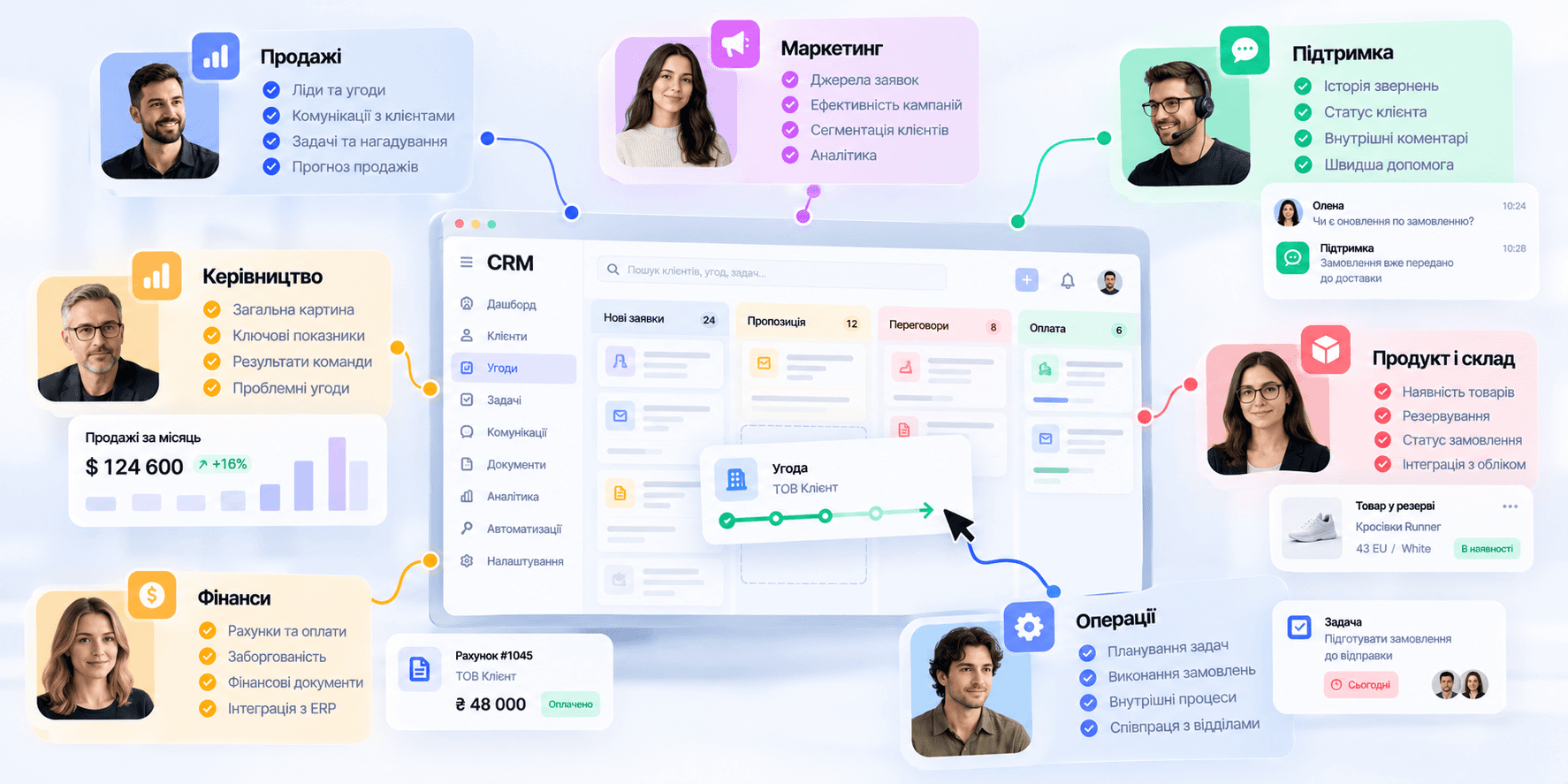
CRMs are often associated exclusively with sales reps, but customer data can be essential to many more teams.
Marketing can leverage data on lead sources and customer segments. Support can access interaction history and previous requests. Finance can receive invoice and payment details. Executives can monitor key performance indicators and overall sales health.
That is why, as a company expands, a CRM can evolve from a single department's tool into an integral part of the overall corporate ecosystem.
Who needs a CRM system
There is no specific employee headcount threshold that dictates when a company must implement a CRM. The complexity of operations matters much more. Even a small team may need a CRM if it handles a large volume of inquiries simultaneously, has a long sales cycle, or uses multiple communication channels. There are several clear indicators.
Client details are scattered across multiple spreadsheets. Managers keep their own private lists. Leadership lacks visibility into the real status of deals. Inquiries occasionally slip through the cracks. It's difficult to determine why clients are lost. Onboarding a new hire takes too long because the process isn't clear. Creating reports requires manually gathering data from several sources.
When these situations become routine, the issue is no longer just team discipline. The business likely needs a system that structures the process itself.
When a CRM might be unnecessary
A CRM shouldn't be implemented just because other companies use one.
If a business works with only a handful of regular clients, the sales process is straightforward, and all necessary details are easily managed without an extra platform, a complex CRM may create more overhead than value.
Furthermore, a CRM won't magically fix a poorly organized process.
If the team doesn't understand the sales stages, employee responsibilities are vague, and data is entered erratically, a new system will simply move that chaos into a different interface.
Technology should support an established process, not try to replace it.
Types of CRM systems

CRMs can be categorized in various ways, but for a business, it's most practical to look at the primary problem the system needs to solve.
Operational CRMs
The core focus of these systems is on daily routine workflows.
Leads, deals, tasks, communications, reminders, and automations help managers interact with clients and guide deals through the pipeline.
Analytical CRMs
These systems are more oriented toward working with data.
They help analyze customer behavior, segments, sales, channel efficiency, and other metrics.
Collaborative CRMs
Their goal is to coordinate multiple teams around a single customer.
Sales, marketing, support, and other departments can work from a single unified interaction history.
Combined (Hybrid) CRMs
In practice, many modern platforms combine capabilities from several types.
Consequently, the boundary between them is becoming blurred. It is far more important to identify which specific processes your company needs to support.
Cloud-based vs. on-premise CRM
A cloud CRM runs over the internet and typically does not require installing software on every employee's computer. It functions as a SaaS product. This model suits distributed teams working from various locations and enables faster system deployment.
An on-premise CRM is hosted on the company's own infrastructure. It may be relevant for organizations with strict infrastructure requirements, specialized data governance, or custom internal integrations.
The choice depends not only on functional needs, but also on security standards, scalability, maintenance, and the company's overarching IT architecture.
CRM and ERP are not the same thing

CRM and ERP can be components of a single business ecosystem, but they address different challenges. A CRM focuses primarily on clients, leads, sales, communications, and relationships. An ERP takes a broader look at company resources and internal operations. This includes finance, procurement, inventory, manufacturing, logistics, and other processes.
For example, a CRM can show that a client approved an order. At that point, the ERP can check stock levels, trigger procurement or production, and pass details along to logistics. Therefore, in complex companies, CRM and ERP systems are frequently integrated.
Off-the-shelf CRM vs. custom system
This is one of the most critical questions before implementation. An off-the-shelf CRM fits well when business processes are fairly standard and can adapt to the existing platform's capabilities. It allows for a faster rollout without building core functionality from scratch. However, as the company grows, bespoke processes may emerge.
For example, an unusual deal structure, diverse client tiers, complex role permissions, specific document workflows, internal approvals, custom pricing logic, or integrations with legacy corporate systems. In such cases, teams often end up building dozens of workarounds around the off-the-shelf CRM.
If employees continuously export data to spreadsheets, duplicate records in other software, or conduct a large share of work outside the CRM, it's worth evaluating whether the platform matches the actual business processes.
Sometimes fine-tuning the existing CRM is enough. In other cases, it makes more sense to design a custom CRM or an internal tool.
A business shouldn't adapt all its processes to a CRM

Any off-the-shelf system carries its own logic. Problems arise when a company begins altering efficient processes merely because a particular CRM doesn't accommodate them.
Of course, a CRM rollout can sometimes help streamline redundant or disorganized workflows. But decisions must be driven by business logic, not the constraints of a specific interface.
Before selecting or designing a system, it is best to first outline your real operational workflow. Where does the client come from? What data needs to be gathered? Who manages them at each stage? What decisions are made? What documents are created? Where does data go? What needs automation? Only then should you define the CRM's structure.
Why UX is especially critical for CRM systems
A CRM can feature a massive list of capabilities and yet remain cumbersome for daily work. This is a serious issue, as managers may spend several hours—or their entire day—working in the system.
If completing a simple action requires navigating through five screens, a user wastes valuable time hundreds of times a month. If a client record is cluttered with dozens of fields, key data gets lost in secondary noise. If every role sees the exact same interface, everyone is forced to constantly filter out irrelevant information.
Poor UX in an internal tool gradually evolves into an operational liability for the business.
A good CRM displays the right information at the right time
Not every user needs every capability of the system. A sales representative needs to quickly see new leads, today's tasks, active deals, and customer history. A manager needs different insights: pipeline status, team results, forecasts, and stalled deals. A financial officer cares about payments, invoices, and receivables. Meanwhile, an administrator needs users, roles, integrations, and settings.
A well-designed CRM interface accounts for these differences and avoids pushing the same dataset to everyone.
A CRM dashboard should drive decision-making
A dashboard doesn't become useful just because it contains many charts. Its job is to quickly reveal the state of the process and highlight where attention is required. It should also allow enabling or disabling functionality as needed.
For instance, an executive might need to immediately spot new leads, idle deals, overdue tasks, stage-to-stage conversion, and sales forecasts. Instead of high-level analytics, a manager benefits more from their personal task queue, clients awaiting replies, and deals needing immediate next steps.
That is why an effective dashboard is designed around the decisions a user must make, rather than simply displaying available data.
Automation shouldn't feel like black magic
The more processes a CRM automates, the more essential it is to explain to the user what is happening at any given moment. If the system automatically changed a status, created a task, sent an email, or synced data to another service, the user should be able to understand why without difficulty. Otherwise, automation breeds distrust.
Great UX in complex business systems makes automated workflows predictable. The user sees the outcome, understands the logic, and can review the audit history at any time.
How to know when a CRM needs a redesign

Not every system requires a full redesign. However, there are distinctive indicators of systemic UX flaws.
Employees keep shadow spreadsheets. Onboarding new hires to the CRM takes a long time. Certain features are completely ignored by the team. Routine actions require excessive repetitive steps. Managers regularly make data entry mistakes. Leaders export data just to generate a comprehensible report in another tool.
Another major indicator appears when a system has evolved over many years. New modules were gradually grafted onto an outdated framework, navigation grew complicated, and logic across different product areas fell out of sync.
In such circumstances, the root issue lies not in individual screens, but in the product architecture itself.
How to properly design a CRM system
Designing a CRM shouldn't begin with a dashboard or polished tables. First, examine the processes and understand who will use the system. What roles exist? What tasks do they perform daily? How are sales currently conducted? Where do delays occur? What information passes between departments? What tasks are repetitive?
Only then can you outline the primary user flows and information architecture.
Next, define the system's core entities: clients, companies, leads, deals, tasks, documents, payments, and other objects specific to the business. Only after this groundwork is complete should you move to screen layouts and UI design.
This approach allows you to design a CRM centered around the actual work of the company, rather than an abstract set of features. If you have any questions or need assistance with design, visit our contact page and get in touch.
A CRM should simplify business processes, not introduce new ones

A good CRM is almost invisible during daily work. The manager doesn't think about how to use the software; they think about the client and the next step. The executive doesn't have to piece together reports manually; the necessary data is already organized and at their fingertips.
Teams don't send spreadsheets back and forth because they operate with live data in a shared environment. That is where the real value of a CRM lies.
It is not just about keeping clients in a database—it is about creating a clear system that helps a business manage sales, client relationships, and internal workflows without unnecessary chaos.


" width="68.80023495816431px"><path d="M 4.853 0.229 C 2.752 -0.794 0.742 1.857 0 3.31 C 0.62 7.42 0.421 10.396 0.244 11.37 C 1.34 12.771 4.906 13.54 5.957 11.548 C 7.007 9.558 7.477 1.511 4.852 0.23 Z" fill="rgb(255, 255, 255)" height="12.755288116790886px" id="ZCZVTiIXa" stroke-dasharray="" stroke-linecap="butt" stroke-linejoin="miter" stroke-miterlimit="10" stroke-width="1.23" stroke="rgb(0, 0, 0)" transform="translate(62.007 43.767)" width="6.793097659580333px"/><path d="M 0 0 C 1.437 0.617 2.272 3.716 0.258 5.234" fill="transparent" height="5.233798974902236px" id="AacllobhZ" stroke-dasharray="" stroke-linecap="butt" stroke-linejoin="miter" stroke-miterlimit="10" stroke-width="1.23" stroke="rgb(0, 0, 0)" transform="translate(64.709 47.658)" width="1.4545419866479055px"/><path d="M 1.94 0.229 C 4.041 -0.794 6.051 1.857 6.794 3.31 C 6.173 7.42 6.372 10.396 6.549 11.37 C 5.454 12.771 1.887 13.54 0.837 11.548 C -0.214 9.558 -0.684 1.511 1.94 0.23 Z" fill="rgb(255, 255, 255)" height="12.755288116790886px" id="pEDJQVy2w" stroke-dasharray="" stroke-linecap="butt" stroke-linejoin="miter" stroke-miterlimit="10" stroke-width="1.23" stroke="rgb(0, 0, 0)" transform="translate(0 43.767)" width="6.7942440549467005px"/><path d="M 1.455 0 C 0.018 0.617 -0.818 3.716 1.197 5.234" fill="transparent" height="5.233798974902236px" id="xOvJKZNxm" stroke-dasharray="" stroke-linecap="butt" stroke-linejoin="miter" stroke-miterlimit="10" stroke-width="1.23" stroke="rgb(0, 0, 0)" transform="translate(2.638 47.658)" width="1.4550601551503437px"/><path d="M 38.403 68.113 C 26.454 72.892 13.11 63.334 7.932 57.955 C 2.196 50.786 0.363 36.246 0.164 29.874 C -0.314 26.05 0.363 17.527 0.763 13.743 L 3.749 5.376 L 14.504 1.195 L 37.806 0 C 39.997 0.398 45.454 1.553 49.755 2.987 C 55.133 4.78 57.522 13.742 58.121 16.133 C 58.599 18.044 58.32 34.853 58.121 43.019 C 57.522 47.798 53.341 62.138 38.403 68.113 Z" fill="rgb(255, 255, 255)" height="69.41149940138297px" id="yZYyIx6io" stroke-dasharray="" stroke-linecap="butt" stroke-linejoin="round" stroke-width="1.23" stroke="rgb(0, 0, 0)" transform="translate(4.872 16.589)" width="58.38457217823136px"/><path d="M 16.131 9.081 C 13.941 3.704 7.648 -4.303 0 6.69 C 2.191 10.675 8.485 16.728 16.131 9.081 Z M 28.678 7.886 C 30.868 2.508 37.162 -5.497 44.809 5.496 C 42.619 9.479 36.326 15.534 28.678 7.886 Z" fill="transparent" height="12.75153470949805px" id="Q5nplVQds" stroke-dasharray="" stroke-linecap="butt" stroke-linejoin="miter" stroke-miterlimit="10" stroke-width="1.23" stroke="rgb(0, 0, 0)" transform="translate(11.605 43.954)" width="44.80918164991997px"/><path d="M 0 4.182 C 0 1.872 1.872 0 4.182 0 C 6.492 0 8.364 1.872 8.364 4.182 C 8.364 6.492 6.492 8.364 4.182 8.364 C 1.872 8.364 0 6.492 0 4.182 Z" fill="rgb(0, 0, 0)" height="8.364249629374285px" id="CsixW4Nye" transform="translate(43.274 45.863)" width="8.364249629374271px"/><path d="M 0 4.182 C 0 1.872 1.872 0 4.182 0 C 6.492 0 8.364 1.872 8.364 4.182 C 8.364 6.492 6.492 8.364 4.182 8.364 C 1.872 8.364 0 6.492 0 4.182 Z" fill="rgb(0, 0, 0)" height="8.364249629374264px" id="mtQGxWjK3" transform="translate(14.591 47.061)" width="8.364249629374267px"/><path d="M 0 1.195 C 0 0.535 0.535 0 1.195 0 C 1.856 0 2.391 0.535 2.391 1.195 C 2.391 1.856 1.856 2.391 1.195 2.391 C 0.535 2.391 0 1.856 0 1.195 Z" fill="rgb(255, 255, 255)" height="2.3908386866572187px" id="w8AgI4KSu" transform="translate(48.05 48.255)" width="2.390838686657247px"/><path d="M 0 1.195 C 0 0.535 0.535 0 1.195 0 C 1.856 0 2.391 0.535 2.391 1.195 C 2.391 1.856 1.856 2.391 1.195 2.391 C 0.535 2.391 0 1.856 0 1.195 Z" fill="rgb(255, 255, 255)" height="2.3908386866572187px" id="RFyjFdh2K" transform="translate(19.375 49.451)" width="2.3908386866572506px"/><path d="M 4.036 1.556 C 1.73 1.146 0.385 3.427 0 5.128 C 2.306 3.086 4.036 3.257 4.613 3.596 C 6.459 5.23 11.149 5.299 13.263 5.128 C 17.876 4.618 15.569 1.554 13.84 2.065 C 12.616 2.425 6.919 2.065 4.036 1.554 Z M 40.698 0.085 C 43.061 -0.431 44.581 1.513 45.076 3.004 C 42.574 1.336 40.795 1.601 40.218 1.943 C 38.402 3.519 33.557 3.889 31.36 3.875 C 26.562 3.724 28.774 0.842 30.591 1.184 C 31.876 1.424 37.746 0.73 40.698 0.085 Z" fill="rgb(0, 0, 0)" height="5.192087782726427px" id="gD39dSMek" stroke-dasharray="" stroke-linecap="butt" stroke-linejoin="miter" stroke-miterlimit="10" stroke-width="1.23" stroke="rgb(0, 0, 0)" transform="translate(11.346 36.58)" width="45.07578690879518px"/><path d="M 56.257 17.784 C 61.635 20.772 61.235 35.509 60.439 42.878 C 58.528 41.444 57.65 36.305 57.451 33.917 C 57.451 20.054 45.9 18.183 40.125 18.979 C 33.91 22.325 22.798 21.17 18.017 20.175 C 4.634 18.741 2.086 35.51 2.484 44.073 C 1.05 39.772 1.488 30.332 1.886 26.148 C 0.93 25.671 -0.106 21.967 0.093 20.175 C -0.385 17.306 1.089 16.192 1.886 15.993 C 0.452 13.124 1.289 11.212 2.484 10.615 C 1.05 8.224 4.675 5.238 6.666 4.042 C 6.187 2.13 9.255 1.253 10.848 1.055 C 10.848 0.1 15.23 0.259 16.823 1.055 C 17.779 -0.856 21.602 0.259 23.396 1.055 C 25.187 -1.334 31.163 2.25 31.76 1.653 C 32.357 1.054 43.71 4.042 50.283 8.225 C 55.541 11.57 56.456 15.991 56.257 17.784 Z" fill="rgb(0, 0, 0)" height="44.07331699872831px" id="IBXo1afcW" stroke-dasharray="" stroke-linecap="butt" stroke-linejoin="round" stroke-width="1.23" stroke="rgb(0, 0, 0)" transform="translate(3.149 0)" width="60.90540811136909px"/><path d="M 4.914 8.6 C 4.928 7.32 3.966 4.3 0 2.457 M 14.743 6.143 C 14.758 4.863 13.795 1.843 9.829 0 M 25.8 6.143 C 25.815 4.863 24.852 1.843 20.886 0 M 38.086 9.829 C 38.1 8.549 37.138 5.529 33.172 3.686" fill="transparent" height="9.828730631218367px" id="yF9hvy0D6" stroke-dasharray="" stroke-linecap="butt" stroke-linejoin="miter" stroke-miterlimit="10" stroke-width="1.23" stroke="rgb(255, 255, 255)" transform="translate(10.118 1.229)" width="38.08647011135237px"/><path d="M 15.972 6.143 C 12.985 1.508 5.609 -4.983 0 6.143" fill="transparent" height="6.143186797809202px" id="S7kDdhPuD" stroke-dasharray="" stroke-linecap="butt" stroke-linejoin="round" stroke-width="1.23" stroke="rgb(0, 0, 0)" transform="translate(27.028 65.115)" width="15.971687012612456px"/><path d="M 3.106 0.493 C 4.998 3.584 7.703 9.993 3.395 10.901 C -1.99 12.035 0.346 1.417 1.566 0" fill="transparent" height="10.985871866875232px" id="m1g0PK9jZ" stroke-dasharray="" stroke-linecap="butt" stroke-linejoin="round" stroke-width="1.23" stroke="rgb(0, 0, 0)" transform="translate(31.777 54.002)" width="5.699674962042929px"/></g></svg>)